FM27 Tactical Effectiveness Analyzer: Find the Reading to Check
Find which players and tactical factors need a closer look in your save.
Import your squad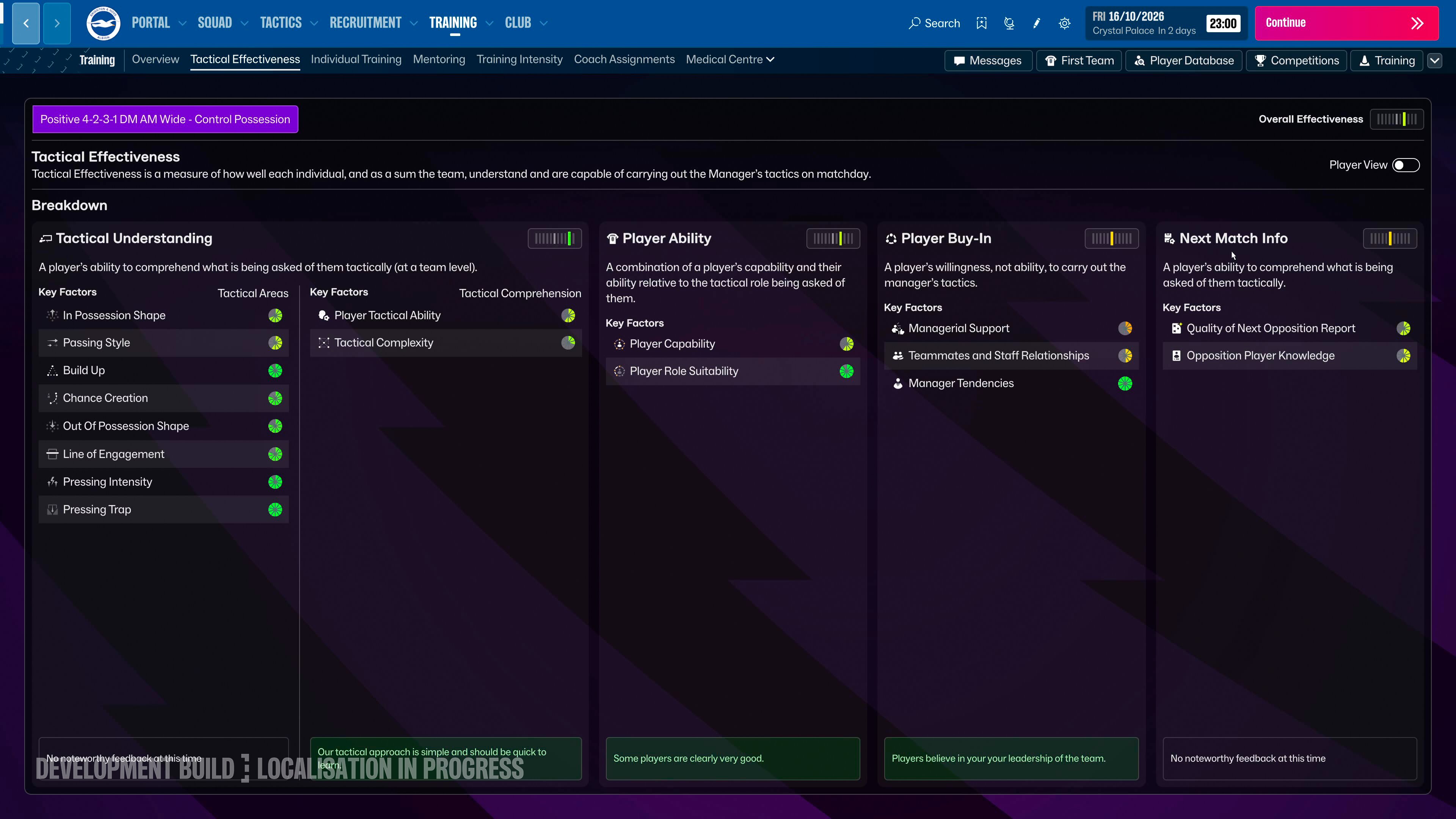
Bring your squad into focus
Choose an FM27 career save or a squad CSV once. Your lineup, depth and planning tools use the same players.
Your save is read on your device. Only the squad you import is kept in this browser for your next visit.The save reader looks for your managed club, positions, attributes and contract dates. No game installation needs to be running. If a reading is missing or the save cannot be read, a squad CSV can provide another route.
How to get a useful FM27 squad CSV
On Windows, FM View Exporter can save the squad table as CSV. Its Analyzer squad view includes player IDs, contracts and the attributes needed for role comparisons. Open that view in FM27, then export the squad. A FMSuperScout shortlist CSV works for basic coverage and finance, but its CSV does not include attributes.
For an initial check, the file needs player names and positions. Add age or birth date, wages, contract dates and attributes when your view offers them; the page will name anything it cannot read.
After Tactical Fit Analyzer
Your imported squad carries over when you open a related tool.
01Squad AnalyzerSee which positions need cover and which squad decisions deserve attention.
 02Best XI Planner
See your best available eleven on the pitch, compare cover and test a second shape without changing players.
03Role Suitability CheckSee the roles named in your game view and compare what the attributes suggest.
Why does FM27 show low Tactical Effectiveness?
Import a view that includes Tactical Effectiveness readings and the analyzer names players with a low game-view label. Where the export contains them, it separates tactical understanding, player ability, player buy-in and next-match information. You can then inspect the factor that needs attention instead of treating every low reading as a player attribute problem.
FM27 describes those four areas in its Tactical Effectiveness screen. This tool does not reproduce the game's hidden calculation or turn the labels into a predicted match result. If your CSV has no tactical columns, the page tells you exactly which readings to add to the view before it can identify a factor.
Separate role attributes from tactical fitWhat should you do with a low reading?
Open the flagged player in your save and compare the named factor with the current tactic and next opponent. A low understanding reading calls for a different check from a low next-match information reading. If a player looks suitable for the role but the team's tactical label remains low, changing the role score in this tool will not resolve that game-view signal.
Turn a low label into the next check
A low imported label is a starting point. If understanding is the flagged factor, inspect that player's familiarity with the current tactic. If next-match information is low, look at the match preparation context. A player-ability concern calls for a different comparison with the role and the available alternatives. The page keeps those areas separate when the export includes them, so one low factor does not become a claim that the whole player is unsuitable.
When the file supplies only an overall Tactical Effectiveness label, the tool can identify who needs attention but cannot tell you which of the four areas caused it. Add those columns to a later export for a more specific answer. The role page can compare the player's attributes, and Best XI can test a different lineup, but neither computes the hidden game value or predicts what will happen against the next opponent.
Use Tactical Fit Analyzer for your next decision
Find players with low Tactical Effectiveness or one low supporting factor.
- Import a view with tactical readings.
- Review the players flagged by the game’s labels.
- See the named factor beside each flagged player.
Does this calculate Tactical Effectiveness?
No. It reads the game-view labels you imported and does not invent a combined score.
What these results can tell you
Your player names, positions and other readings come from the file you choose. Missing values stay unknown. Your squad remains in this browser until you remove it.
The four Tactical Effectiveness factors are described by Sports Interactive. This page points out low labels already in your game view; it does not calculate the game’s score.