
Tools · Thunderstore
Visit listing ↗r2modman
A simple and easy to use mod manager for many games using Thunderstore
by ebkr · v3.2.21Search by feature, then open a mod page for installation steps and game version support.
35 matching listings. Open a listing below to check its current game compatibility and dependencies.
A simple and easy to use mod manager for many games using Thunderstore
by ebkr · v3.2.21
BepInEx pack for Mono Unity games. Preconfigured and ready to use.
by BepInEx · v5.4.2305
A modern and lightweight alternative mod manager for Thunderstore.
by Kesomannen · v1.23.3
Adds the Vibe Gambling playthrough card: each deadline only asks for 1% of its usual deposit. Already beat the game? Just spin. (Replaces Delusions of Grandeur.)
by RicksMods · v1.0.1
Essential performance optimization and bugfix mod for CloverPit. Fixes high-deadline freezes, camera softlocks, and ticket integer overflows.
by CoderCo · v1.0.1
Small QOL features for CloverPit
by IngoH · v1.0.2
API for CloverPit
by ModdingAPIs · v0.2.2
Adds 30 charms from the start of the game. Leaderboard submissions are disabled with this mod active.
by flumpus · v2.0.0
Adds a Rich Presence to Discord to show how much debt, coins, and the deadline you are on.
by flumpus · v2.0.1
A multiworld randomizer mod to work with archipelago, find the APWorld on the github
by Syntheal · v1.2.2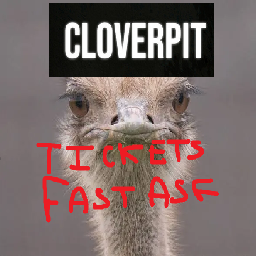
Speed up ticket animation with different modes
by ThalrodTeam · v1.1.1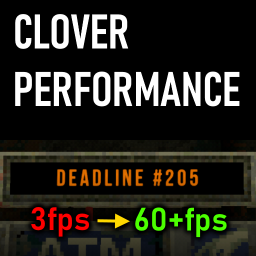
Performance patches for very high deadlines
by Ooseykins · v1.0.0
Archipelago hint game implementation for CloverPit
by Calebri · v1.1.1
All Charms Are Jimbos
by pharmacomaniac · v0.1.3
A mod to add BossmanJack Sound Clips to the game.
by riggedchips · v0.1.1
Does the spinnin' so you can focus on winnin'
by pharmacomaniac · v0.1.0
Speed up CloverPit with this configurable QOL mod! Speed up animations, skip cutscenes, fast deposit/interest, and more!
by pharmacomaniac · v0.1.1
Feeling unlucky? Know for sure with real-time 666 Odds!
by pharmacomaniac · v0.1.3
[Dev Tool] Remove Twitch Pings From Logs
by pharmacomaniac · v0.1.0
Allows you to press P to piss anywhere
by MintyFox · v1.0.0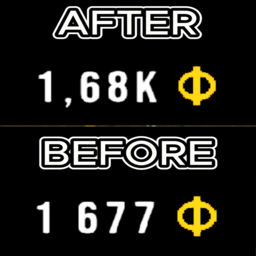
No more scientific notation! Converts 8.41e+31 → 841.00Dc. Makes large numbers readable with K/M/B/T+ suffixes. Simple QoL improvement that should've been in the game.
by PxntxrezStudio · v1.0.1
Automatically collects Interest immediately after it is credited to CloverPit.
by MjKey · v1.0.1
Changes startup jingle to include radxflipnote's catchphrase proper
by JustOnce · v1.0.0
A mod for delusional players
by Hamsa · v1.0.0Skip the opening screens when starting the game.
by Cubandsweety · v1.0.0Show large values in a readable format instead of scientific notation.
by PxntxrezAdjust field of view, transition speed, drawer controls, ATM deposits and other options.
by muldizzleOpen a menu for coins, tickets, charms and telephone abilities.
by scupuloChange the number of charms you can equip before upgrades.
by TraktoolRestart without choosing your memory card again.
by JanitorialMessIn-game menu for currency, charms, odds, luck and run settings.
by Wambo420Rambo · v2.0.0Remove the rising coin cost of shop restocks.
by SetuyaSoraIncrease charm capacity through the Property Certificate.
by SetuyaSoraEdit a save while the game is running.
by CubandsweetyRemove cooldowns from Red Button powerups.
by SentinelRead the mod page before installing to check your game version and DLC.
Filter the directory by feature or search a mod name, then open its listing on Thunderstore or Nexus Mods. Read the author instructions, dependencies and supported game version before installation.
A mod may change balance, saves or leaderboard eligibility. Use a separate profile or backup if you want to preserve an unmodded run. The listing is the source for current compatibility and files.
Open its Thunderstore or Nexus Mods listing from the directory, then follow the instructions there.
Compatibility can change after a patch. Check the listing update date and supported version before installing.
They may. Check the current game and mod rules before using a modified run for rankings.